Options in the Sim Traderoom
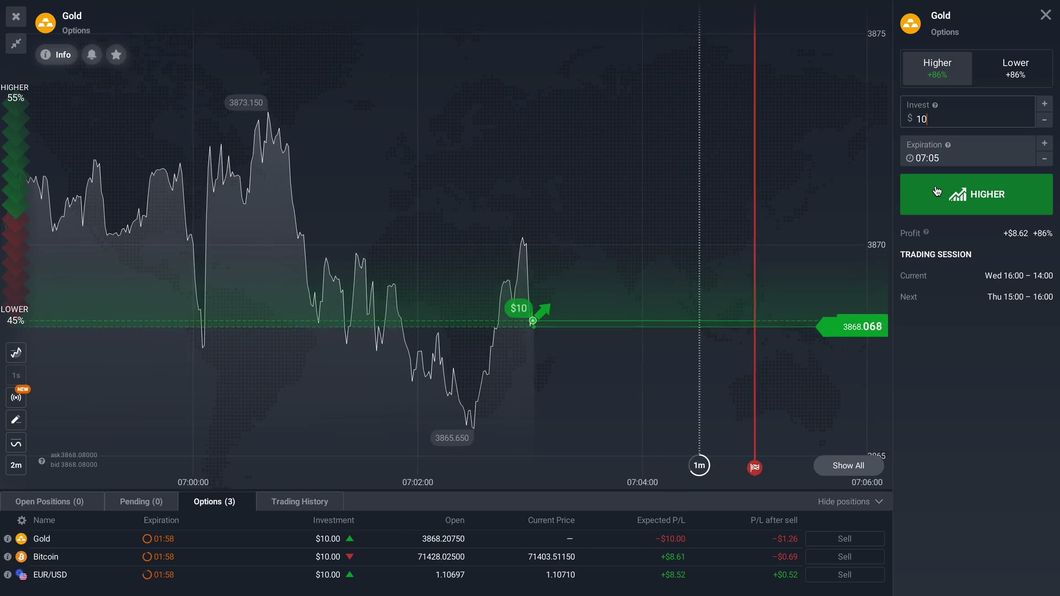
Options are now available in the SabioTrade Sim Traderoom as a simulated trading instrument. Choose an asset, select a strike price, pick Higher or Lower, and set an expiration. Your position is settled when the option expires.
Available Options
You can currently explore Options on selected assets, including:
| Asset | Type | Open details |
|---|---|---|
 Euro / US Dollar · Forex | Forex | Details |
 British Pound / US Dollar · Forex | Forex | Details |
 Australian Dollar / US Dollar · Forex | Forex | Details |
 US Dollar / Japanese Yen · Forex | Forex | Details |
 US Dollar / Canadian Dollar · Forex | Forex | Details |
 US Dollar / Swiss Franc · Forex | Forex | Details |
 New Zealand Dollar / US Dollar · Forex | Forex | Details |
 Gold / US Dollar · Commodity | Commodity | Details |
 Silver / US Dollar · Commodity | Commodity | Details |
 Bitcoin / US Dollar · Cryptocurrency | Cryptocurrency | Details |
 Ethereum / US Dollar · Cryptocurrency | Cryptocurrency | Details |
Available instruments may change. Check the Sim Traderoom for the current list.
How Options Work
An option is a time-limited simulated financial instrument based on the price of an underlying asset, with a fixed simulated trade amount and defined risk. Here’s how it works:
Choose an Asset
Open the Options tab and pick an asset from the list, such as EUR/USD, Gold, or Bitcoin.
Choose a Direction
Select Higher if you expect the price to finish above the strike, or Lower if you expect it to finish below.
Choose an Expiration
Open the Expiration field and pick 5 or 15 minutes.
Choose a Strike Price
The strike is the price level the result is measured against. You can also use the current market price as your reference.
Open the Option
Enter your simulated amount, then press the button to open the position.
Wait for Expiration
At the selected expiration the option ends and the result appears on the chart. It depends on whether the price finishes on the expected side of the strike.
Options Rules
Options follow the applicable SabioTrade account rules. This includes:
-
Options can contribute to the Profit Target during the Evaluation.
DetailsProfit Target
Options can contribute to the Profit Target during the Evaluation.
The Profit Target is the profit your account needs to reach to pass the Evaluation. Closed profit must meet the current target, including any Consistency Rule adjustment.
- Single Account
- Initially 10%
- Intraday Account
- Initially 12%
See the full Rules →Common mistake
Reaching the Profit Target alone does not pass the Evaluation. You must meet all applicable rules and requirements.
-
Simulated losses from Options count toward the applicable limit.
DetailsDaily Loss Limit
Simulated losses from Options count toward the applicable limit.
The limit is based on your previous day's closed balance, calculated at 00:00 UTC (7:00 PM ET). It is checked against your current equity, so open positions count.
When you open an option, the simulated trade amount is deducted from your balance right away and counts toward the limit as soon as the option is opened. If you are close to the limit, opening an option can breach it.
- Single Account
- 5%
- Intraday Account
- 4%
Formula
Daily Loss Limit = Previous Day Closed Balance − (Previous Day Closed Balance × 5%)Example
Single Account with $20,000: 5% is $1,000. If your previous day's closed balance is $20,000, your equity must not fall below $19,000.
See the full Rules →Common mistake
Trading too close to the official limit and forgetting that open positions can change your equity.
-
Open option exposure affects your account equity and can contribute to a drawdown breach.
DetailsMaximum Trailing Drawdown
Open option exposure affects your account equity and can contribute to a drawdown breach.
When your closed balance reaches a new high, your drawdown level moves up with it. Your equity must not fall below that level, even if you have not reached the Daily Loss Limit.
The simulated trade amount of an open option also reduces your equity, so opening an option when you are close to this limit can breach it.
- Single Account
- 6%
- Intraday Account
- 5%
Formula
Maximum Trailing Drawdown = Highwater Mark − (0.06 × Sim Balance)Example
$50,000 account, peak closed balance $53,000: $53,000 − (0.06 × $50,000) = $50,000. Equity cannot fall below $50,000.
See the full Rules →Common mistake
Looking only at the original account balance and forgetting that a trailing limit can move after a new high is reached.
-
Option results are included where the Consistency Rule applies.
DetailsConsistency Rule
Option results are included where the Consistency Rule applies.
Your profit from a single trading day must not exceed 55% of your Profit Target. If you make more than the Recommended Daily Profit Threshold in one day, your Profit Target increases. Option results are included where the rule applies.
- Daily limit
- 55% of the Profit Target
Formula
Recommended Daily Profit Threshold = Profit Target × 55%Example
$100,000 account, 10% target = $10,000, so the threshold is $5,500. If you make $6,850 in one day, the new Profit Target is $6,850 ÷ 0.55 = $12,454.55.
See the full Rules →Common mistake
Reaching the Profit Target in one large trading session and assuming the evaluation is automatically passed. That is not the case: the Profit Target is increased.
-
0.5%
Total Options exposure is limited to 0.5% of your available balance per expiration.
DetailsMaximum exposure
Total Options exposure is limited to 0.5% of your available balance per expiration.
The limit applies to the combined exposure of all options opened during the same expiration, not to each individual option. It is applied separately to each expiration.
- Limit
- 0.5% of the available balance
- Counted
- All options in one expiration together
- Expirations
- 5 and 15 minutes, each with its own limit
Example
If you open an option using 0.4% of your available balance during the 5-minute expiration, you can open another option during that same expiration using no more than the remaining 0.1%.
Read more in the article →Check before you open
Make sure your total options exposure for the selected expiration stays within the 0.5% limit.
-
When you choose a strike price, Higher and Lower availability can change based on market conditions and platform risk-management mechanisms.
DetailsTrading conditions
When you choose a strike price, Higher and Lower availability can change based on market conditions and platform risk-management mechanisms.
When you choose a strike price, Higher and Lower availability can change dynamically. There are two main reasons why one side may be unavailable.
No available strike prices
Market movement can leave no strike prices in one direction. This can prevent certain positions from being opened.
Position balancing
The Sim Traderoom manages the balance between Higher and Lower positions for each asset and expiration. If too many traders open positions in the same direction, additional positions in that direction may be temporarily restricted. Availability can return when trading activity changes.
Read more in the article →Check before you open
Strike prices, displayed simulated profit, expiration availability and Higher/Lower availability can change with market conditions and current platform activity.
Reaching the Profit Target alone does not automatically mean the Evaluation is passed. You must meet all applicable rules and requirements.
Ready to Explore Options?
Learn how simulated Options trading works in the SabioTrade Sim Traderoom, pass the Evaluation and get a Reward Account. You can also deepen your knowledge with Options courses in Sabio Academy.
Or choose a plan
Choose your account size
6 plans · leverage 1:30
Essential
$20,000
Simulated balance
- Performance Reward Percentage
- 80%
- Leverage
- up to 1:30
- Profit Target
- 10%
- Consistency Rule
- 55%
$139 one-time fee
Get $20K accountPlus
$50,000
Simulated balance
- Performance Reward Percentage
- 80%
- Leverage
- up to 1:30
- Profit Target
- 10%
- Consistency Rule
- 55%
$339 one-time fee
Get $50K accountAdvanced
$100,000
Simulated balance
- Performance Reward Percentage
- 90%
- Leverage
- up to 1:30
- Profit Target
- 10%
- Consistency Rule
- 55%
$549 one-time fee
Get $100K accountUltimate
$200,000
Simulated balance
- Performance Reward Percentage
- 90%
- Leverage
- up to 1:30
- Profit Target
- 10%
- Consistency Rule
- 55%
$1,079 one-time fee
Get $200K accountPrime
$650,000
Simulated balance
- Performance Reward Percentage
- 90%
- Leverage
- up to 1:30
- Profit Target
- 10%
- Consistency Rule
- 55%
$3,449 one-time fee
Get $650K accountSupreme
$1,000,000
Simulated balance
- Performance Reward Percentage
- 90%
- Leverage
- up to 1:30
- Profit Target
- 10%
- Consistency Rule
- 55%
$6,889 one-time fee
Get $1M accountChoose your account size
4 plans · leverage 1:100
Blaze
$35,000
Simulated balance
- Performance Reward Percentage
- 90%
- Leverage
- up to 1:100
- Profit Target
- 12%
- Consistency Rule
- 55%
$219 one-time fee
Get $35K accountDaybreak
$50,000
Simulated balance
- Performance Reward Percentage
- 90%
- Leverage
- up to 1:100
- Profit Target
- 12%
- Consistency Rule
- 55%
$559 one-time fee
Get $50K accountSurge
$100,000
Simulated balance
- Performance Reward Percentage
- 90%
- Leverage
- up to 1:100
- Profit Target
- 12%
- Consistency Rule
- 55%
$1,689 one-time fee
Get $100K accountApex
$300,000
Simulated balance
- Performance Reward Percentage
- 95%
- Leverage
- up to 1:100
- Profit Target
- 12%
- Consistency Rule
- 55%
$3,329 one-time fee
Get $300K accountChoose your account size
2 plans · leverage 1:30
Pro 3 · 3 Evaluation Accounts, 3 months
$20,000
Simulated balance
- Performance Reward Percentage
- 80%
- Leverage
- up to 1:30
- Profit Target
- 10%
- Consistency Rule
- 55%
$299
Get $20K accountPro 12 · 12 Evaluation Accounts, 12 months
$20,000
Simulated balance
- Performance Reward Percentage
- 80%
- Leverage
- up to 1:30
- Profit Target
- 10%
- Consistency Rule
- 55%
$959
Get $20K accountOptions are provided in a Sim Trading Environment. You are not buying or selling the underlying asset in live markets. Simulated results do not represent actual trading results and are not a guarantee of future performance.